
- Minimum and recommended specifications
- Why is it essential to have a Falcon haptic device to run Anarkik3DDesign?
- What is the recommended Falcon start up procedure?
- Why can’t I initialise the application in Windows 7 or Vista?
- How do I get the latest drivers for my computer’s graphics card?
- Anarkik3DDesign crashed during startup.
- I have to re-install my hard drive. What happens with my license for Anarkik3DDesign?
- Installing Anarkik3DDesign on a Mac
- Updating and upgrading your software to the latest: V3.1
1. My computer/laptop falls between the minimum and recommended specifications you recommend using the PassMark Performance Test tool. Will it run properly? Test your computer performance as all are built slightly differently. For example: we tested 2 laptops that met the minimum specifications. Anarkik3DDesign was very jerky on one laptop, but it worked well on the second. We put both through the performance test, and the performance scores for the first unworkable one ( Intel P4 1.8GHz, 2048 MB RAM, ATI RADEON 9700) were only 72 on CPU-Floating Point Math, 0.5 on CPU-Multimedia Instructions Graphics, and 9.6 on 3D – Complex. These scores are well below the standard and the recommended scores.
2. Why is it essential to have a Falcon haptic device to run Anarkik3D Design?
Anarkik3DDesign is special for its haptic ‘touch and feel’ interaction and the Falcon haptic 3D device replaces your 2D mouse for the more easy natural 3D navigation and movement it provides for manipulating forms, moving, zooming and rotating. There are other haptic devices in the market. We use the Falcon as it is less expensive and more robust.

Anarkik3DDesign Version 3.1 is generally ‘plug and play’ with no need to download Falcon drivers (as we have embedded these into the software). But computer operating systems are all different and get updated. We recommend downloading up-to-date drivers for the Falcon from here and installing/activating the drivers (Novint Falcon drivers – setup.Falcon.v4.0.28.0_100707.exe) before plugging in the Falcon.
If you get this message 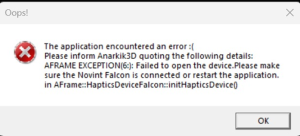 it means that the Falcon’s driver can’t load on your computer/laptop because the Memory Integrity setting in Windows Security is preventing it from loading. Please try turning off the Memory Integrity setting in Windows Security temporarily. To do this go to the Core isolation page in Windows Security. Turn the Memory Integrity setting Off if it isn’t already. You’ll need to restart your computer for the changes to take effect.
- You can also open the Core isolation page by selecting Start > Settings > Update & Security > Windows Security > Device Security and then under Core isolation, selecting Core isolation details.
- Although the Falcon driver has a minor vulnerability that’s preventing it from loading, it’s not malicious in any way.
To activate the haptic cursor and speed up getting into the programme, at the ‘splash screen’ push/pull the Falcon handle in and out gently but firmly and fully to move the cursor!
4. Why can’t I initialize Anarkik3D Design in Windows 7 or Vista? We recommend Windows 8 or 10. However, if you do have Windows 7 or Vista then right click the Anarkik3DDesign icon on your desktop, in the popup menu, select “Property”.
- Within the popup window, choose the “Compatibility” tab.
- Tick the check box for “Run in Compatibility Mode for Win XP (SP3)”, and also tick the check box for “Run as Administrator”.
- After that, just click “OK” and then run Cloud 9.
Note: In Windows 7, after you change the compatibility and when you run Anarkik3DDesign, if you get an error message just ignore it and the software will start. Please be aware that Microsoft no longer support Win7 with updates which means security can be breached.
5. How do I get the latest drivers for my computer’s graphics card? Go to the graphic card manufacturer’s website and search for the latest driver for the model you are using.
- Download the driver (if you are in Windows 7 make sure the driver is for Windows 7)
- Install the downloaded driver and follow the on-screen instructions.
- Start Anarkik3DDesign.
6. Anarkik3D Design crashed during startup. You might need to download the latest version of your graphic card’s drivers.
This is particularly important for university/college users, as when the operating system was installed for the university/college computers, the bundled driver might be a default one, which may cause problems.
On a Mac, make sure that no other programmes are running in the background as this can also cause a crash
7. I have to re-install my hard drive. What happens with my license for Anarkik3D Design? Your Anarkik3DDesign license will be deleted with this action. We will supply you with a new one for a small administration fee of £10. To set up again please send us your original Customer ID which was supplied with your license/activation/pw codes, download Anarkik3DDesign and activate with the new codes we send you.
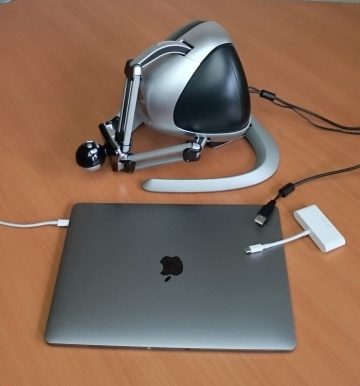
9. Updating and upgrading your software. Anarkik3DDesign V3.1 is the latest and is available in our shop for either PC and for MAC. The price is the same: £430 but the download versions are different: PC from here, the Mac version from here.
To update from an earlier PC version, please follow these straightforward instructions:
Updating from Version 3: If you have Version 3 it is free to update to Version 3.1. No activation code is needed. Simply uninstall the old version, then download V3.1 from here and install.
Upgrading from Version 2: Upgrading your software from Version 2 (Cloud9) to V3.1 is £140.
~ Please buy the upgrade from our shop
~ Download the new version here
~ Contact us for an activation code. Please include as much of the following information as possible:
-
- Name
- Address
- Email address
- Company (if applicable)
- Address
- Your original activation codes and ID
- Date of purchase
- The name of the distributor from which you bought Anarkik3D Design or Cloud9
~ Uninstall previous versions of the software
~ Install the new software
~ Enter the activation code
~ Create! Enjoy your new version of Anarkik3D Design